
Email made safe and simple for the people you love.
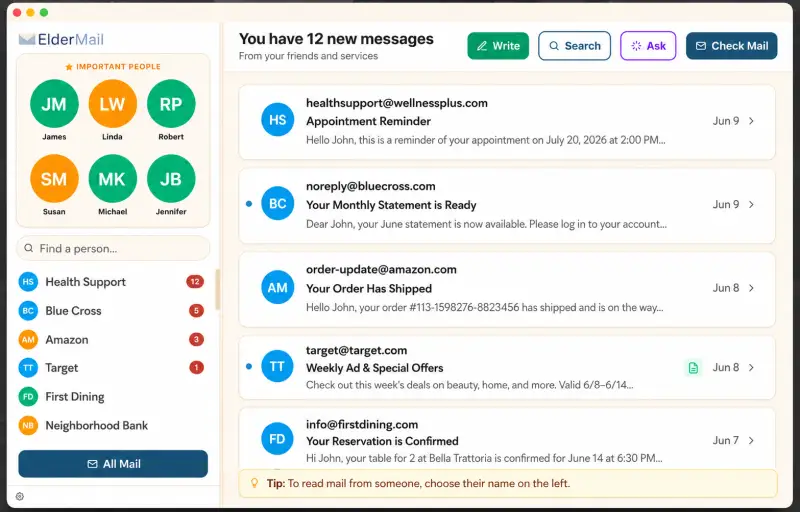
The people they love, always on top
When memory gets unreliable, a crowded inbox becomes a wall of noise — and the people who matter get lost in it. ElderMail starts with their people: pinned favorites sit at the top left, and close friends rise to the top whenever they have new mail, the most recent first.
Everything else — stores, banks, appointment reminders — waits below. One tap on a name shows just that person's mail.
- Favorites pinned at the top left
- Friends with unread mail rise to the top, newest first
- One tap shows a single person's mail
Built for them. Guided by you.
Everything in ElderMail is designed around two people: the elder who reads the mail, and the family member who keeps it safe.
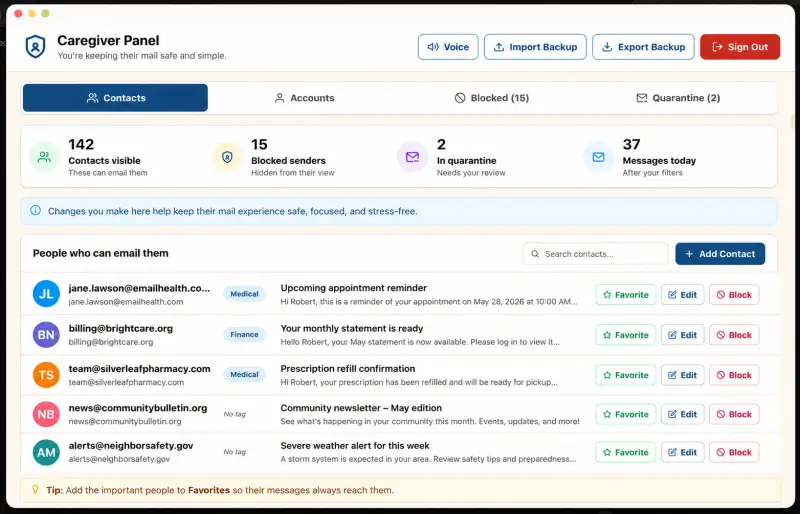
A safety net, run by someone they trust
Behind a PIN, a family member gets a simple control panel: manage the contact list, block unwanted senders, and review quarantined mail. The elder never sees any of it — they just see a calmer inbox.
- Choose who can email them, and mark favorites so those messages always reach them
- Block scammers and unwanted senders
- Review quarantined mail
- Report spam to SpamCop, the FTC, and the sender's ISP
- Import and export backups
Your mail never leaves your computer.
Every message is stored in an encrypted database on the Mac itself. There are no ElderMail servers — we cannot read, store, or receive anyone's mail. The built-in AI assistant runs entirely on the device. No analytics, no ads, and your data is never sold or shared.
ElderMail and your Google data
ElderMail connects to your Gmail account to show and send your mail. Your messages stay on your computer.
ElderMail is a full email client, so it asks Google for the Gmail mail scope (https://mail.google.com/) along with your email address and basic profile. It uses that access for exactly four things: displaying your mail, sending messages you write when you press Send, organizing your contacts, and answering questions about your mail with an assistant that runs entirely on your Mac.
Your messages are stored only in an encrypted database on your computer, and your sign-in tokens are kept in the macOS Keychain. ElderMail has no servers — your mail is never uploaded to us, never sold or shared, never used for advertising, and never used to train AI models.
You can disconnect at any time: remove the account inside ElderMail, or revoke access at myaccount.google.com/permissions. Read the full Privacy Policy for details.
ElderMail for Mac is coming soon
We're putting the finishing touches on ElderMail. Questions or feedback? We'd love to hear from you.